







Metadata Registry
The Metadata Registry View allows authorized users to define a system-wide catalog of known remote datasets, which are described by means of a combination of (metadata) vocabularies, including DCAT, LIME/VoID, FOAF and DCMI Metadata Terms. Additionally, the Metadata Registry uses a small RDF vocabulary to represent metadata that falls beyond the scope of the standard vocabularies that have been mentioned previously.
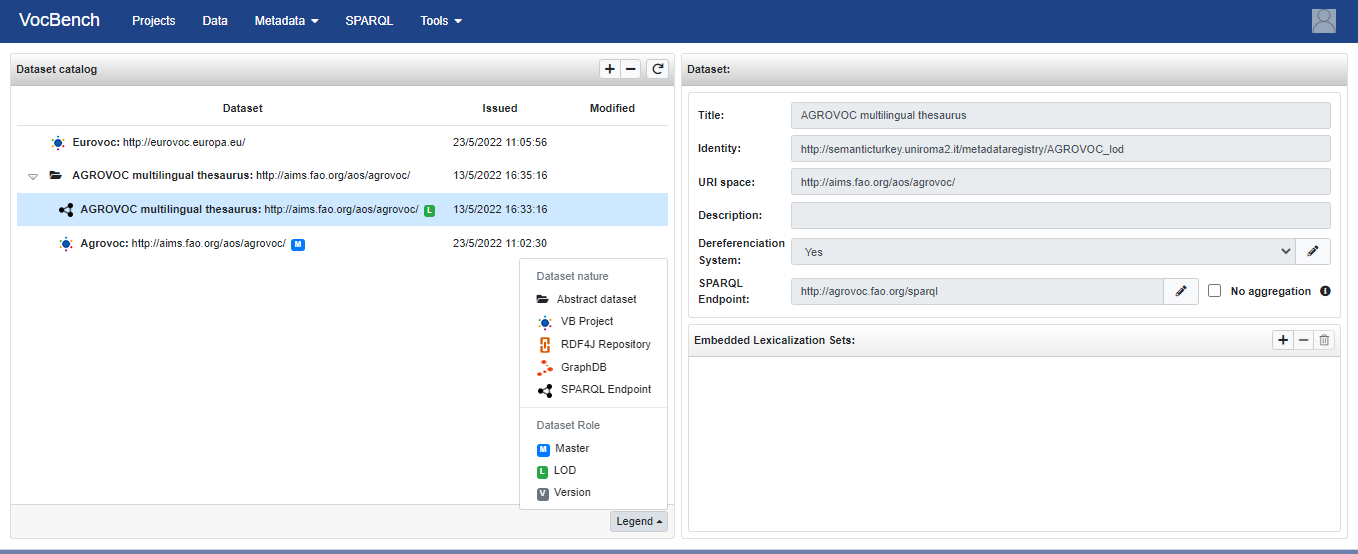
The UI is mainly composed by two panels: the left panel (Dataset Catalog) lists all the datasets defined in the system, while the right one (Dataset or Dataset version depending on which element was selected in the left part) shows details about the selected dataset.
Two kinds of datasets can be distinguished: dataset abstractions and concrete datasets. A dataset abstraction is kind of like a general reference to a dataset, that gives some identity to it despite its many realizations. A concrete dataset identifies a specific version (in a broad sense) of the dataset. It could be a numeric release version (e.g. 5.0.10), or some particular evolving datasets, e.g. the master version of the dataset being edited on VocBench, or the LOD Dataset with its SPARQL endpoint.
The Dataset Catalog is represented as a tree. In this tree, we can have, as roots, both abstract datasets and concrete datasets. A dataset abstraction is always a root while a concrete dataset is a root if it has no link to an abstract dataset. When an abstract dataset is expanded its linked concrete datasets are listed.
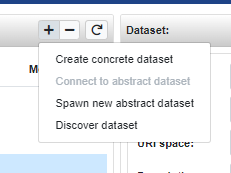
In the Dataset Catalog panel, through the buttons at the top, it is possible to create and delete datasets. There are different ways for creating a dataset:
-
Create dataset: allows to define a dataset abstraction providing the following information:
- Name: the short name associated with the dataset abstraction: it will be used to generate names of resources associated with it in the Metadata Registry;
- URI Space: a URI that is a common string prefix of all entity URIs in the dataset. In other words, the dataset namespace;
- Title: title(s) of the dataset (optional);
- Description: description(s) of the dataset;
- Discover dataset: allows to define a new dataset by letting the system discover it simply providing an IRI, which can identify:
- a resource defined by the dataset (e.g. http://aims.fao.org/aos/agrovoc/c_1071). If available, the system follows the link to the void:Dataset - expressed through the void:inDataset property - describing the containing dataset)
- a void:Dataset, a resource being a sort of metadata proxy for the dataset of interest (e.g. http://aims.fao.org/aos/agrovoc/void.ttl#Agrovoc)
- an owl:Ontology (e.g. http://xmlns.com/foaf/0.1/)
Currently, the discovery process does not include the use of a profiling mechanism to infer missing metadata, such as the lexicalization asset of the dataset. If not found (e.g. in the VoID description of them dataset), this information can be added later as discussed below.
Other options, near the "Creation of a new dataset" are:
- Edit Vocabulary imports
- Export: to export all the data from the MDR (the export file is in trig format)
- Refresh: to reload the data from the MDR into the UI
Near each dataset (abstract or concrete) there is a context menu.
For the Abbstract Dataset the entries are:

- Add LOD realization: to create a new entry under the current Abstract Dataset and this new entry is an LOD version
- Merge into another Dataset: to merge the selected Abstract Dataset into another one. This is done by placing all its Concrete Datasets (if there are no clash with the various version numbers) under the other Abstract Dataset and then removing the current Abstract Dataset
- Delete: to delete, if possible, the selected Abbstract Dataset (if the selected Abstract Dataset has at least one Concrete Dataset, then the deletion is not possible)
For a Concrete Dataset the only entry is:

- Delete: to delete, if possible, the selected Concrete Dataset
The Dataset (or Dataset version) panel (the one on the right) shows details about the selected dataset and allows you to edit some of them.
For the Concrete Datasets, is is possible to add a SPARQL endpoint to it, by clicking on the "Add SPARQL Endpoint" in the "Distributions" part:

It allows you also to provide information about the Embedded Lexicalization Sets and the Embedded linksets (these two are possible only when a Concrete Dataset is selected). These are called embedded, because they are part of the dataset itself, differently from lexicalizations that are shipped as a third-party, autonomous dataset. It is always possible to call the profile, via the "Profile Project" button, to create/update the metadata about the selected Concrete Dataset.


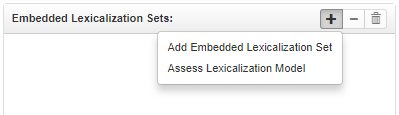
In the tab embedded lexicalization sets, by clickin on the "+" button, there are two to define lexicalization sets:
- Add Embedded Lexicalization Set: allows to provide manually information and statistics about a lexicalization set of the dataset
- Asses Lexicalization Model: let the system discover the lexicalization sets by querying the dataset. In order to exploit this feature it is necessary to provide a SPARQL Endpoint for the given dataset. The discovery uses the MAPLE framework, and in summary tries all known lexicalization model to find the one that best fit the available lexicalizations. To reduce the stress on the SPARQL endpoint (which may not support the complex aggregated queries that would have been necessary), the discovery process does not produce detailed statistics (e.g. the percentage of the resources that have been lexicalized), and it uses an approximated algorithm: it tries to find a given number of resources (currently 100) that have at least one lexicalization, and then uses that sample to determine the available languages.